WorkAdventure 1.31.0 is now available! While there are not many brand-new features in this release, it brings a large number of improvements and bug fixes focused on making WorkAdventure smoother, clearer, and more reliable for everyday use.
New Features
Chat / Matrix improvements
The chat / Matrix integration has been improved in several ways.
Two new features are making their way to the chat:
- The ability to create a poll in a Matrix room, which can be used to ask questions to the other users in the room and get their feedback.
- The ability to create threads in a Matrix room, to have more organized discussions.

Note: to open a new thread, you need to click the “Reply in thread” button on an existing message.

The chat system layout and the room order have also been improved.
We also put a lot of care into Matrix load-time performance. Matrix rooms are now lazy loaded, and the way we fetch rooms and their children has been improved. Big Matrix accounts can still cause a few lags on startup, but the overall performance has been greatly improved.
Allow talking and forming bubbles in audience zones
Should users be allowed to chit-chat in conversation bubbles while a speaker is giving a talk? We first assumed that the answer to this question was “no”. But after receiving feedback from users, we realized the answer was actually “it depends”.
Starting with this version, map designers can decide whether users can talk and form bubbles inside audience zones. This makes audience zones more flexible: they can stay quiet for formal talks, or become more social when the event format calls for it.

A big thank you to our new contributor @Harikesh04 for implementing this feature.
Improvements
Better username rendering
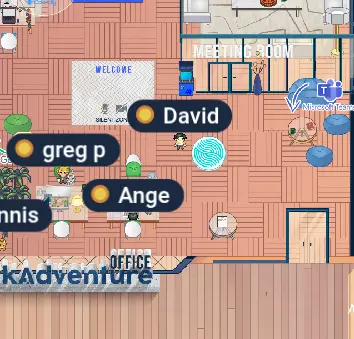
This is a major change in the WorkAdventure design, as the way we render usernames had not been modified since the very start of WorkAdventure.
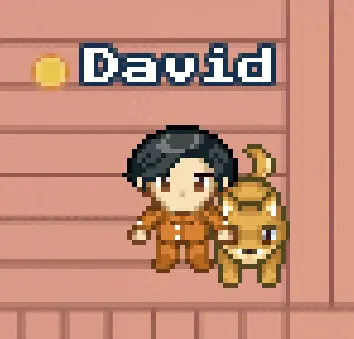
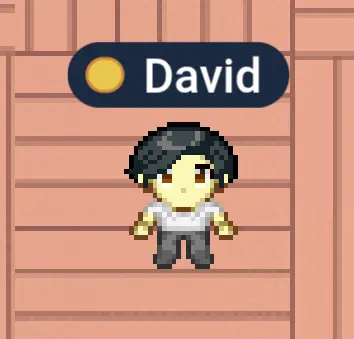
So far, usernames were rendered as part of the main canvas. Each pixel of the font was drawn on the canvas, which means that when zooming in or out, the username was also zoomed in or out, leading to a pixelated rendering. We overcame the pixelation issue by using a natively pixelated font, Press Start 2P. This worked great for a long time, but was not ideal in several ways:
- The username was not readable when zoomed out.
- The username was hard to read for non-Latin alphabet characters, for instance Chinese, Korean, or Arabic characters.
This led us into weird workarounds, like increasing the font size when a non-ASCII character was detected.
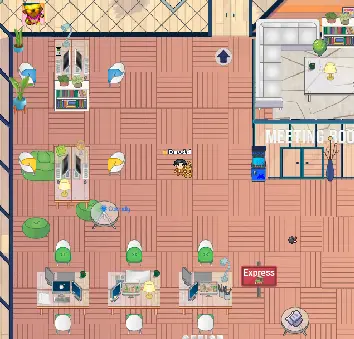
The new font system renders the username on a separate HTML element on top of the main canvas. As a result, we can now use regular fonts, and we can adapt the font size to the zoom level to ensure good readability at all times.
Smoother transitions between video systems
When joining a conversation with a few users, you are first connected to other users through a P2P connection. When the number of users in the conversation exceeds 4 users, the discussion is switched to LiveKit for performance reasons.
In the past, this switch triggered a small flicker that could last between 500ms and 2s, depending on the user’s connection and device performance. During this flicker, a rotating loader was displayed. This could give users the impression that the application had connection issues, despite the fact that the transition was completely normal.
We worked hard to make this transition smoother. The switch between P2P and LiveKit is now almost seamless. We wait for the target system to be completely ready before turning off the previous system, which avoids the flicker and loader display.
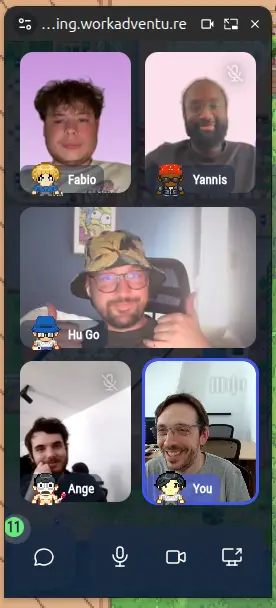
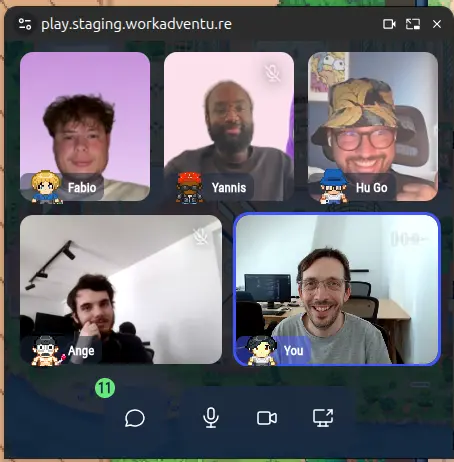
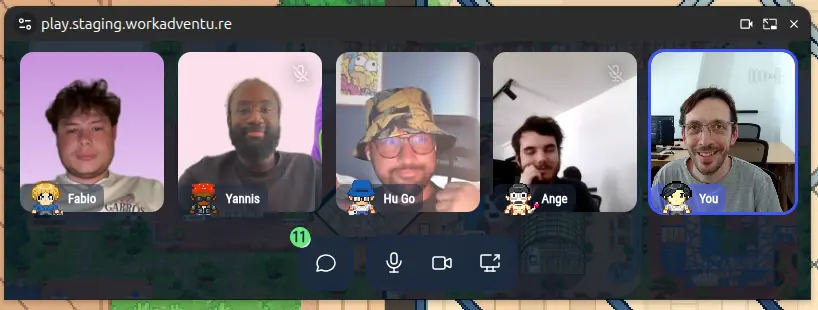
New Picture in Picture layout
The Picture in Picture layout has been improved with a new grid layout that can be used instead of the old vertical layout.
The new grid layout makes better use of the available space and improves the way camera streams are displayed when several videos are visible at the same time.
Smoother zoom
The zoom code has been refactored to be smoother and to better handle edge cases.
This includes improvements to camera management, viewport handling, mouse wheel behavior, slow trackpad zooming, and the way the locate viewport follows camera updates.
New “most used” entities category in the map editor
A new category in the entity editor allows you to find, in one click, the most used entities in your map.
There are thousands of entities available in the map editor, and it can be hard to find the one you are looking for. This new category shows the entities that are used the most in your map, so you can easily find them and reuse them.

New reconnection system
Internet connections are not always stable, and users can sometimes get disconnected from the WorkAdventure server.
In the past, when a user got disconnected, a warning would be displayed, and as soon as the connection was back, the map would completely reload. In the case of micro-disconnections, this would cause the screen to flicker. If the user was in the middle of a discussion, the disconnection could also cause them to miss part of the discussion.
This version of WorkAdventure introduces a new reconnection system that allows users to stay connected to the map even if they experience micro-disconnections. When a disconnection is detected, instead of reloading the map, we display a warning and try to reconnect in the background.
If the reconnection to the websocket happens within 30 seconds, missed messages are replayed and the user remains on the same map without any reload. If the reconnection takes more than 30 seconds, we consider that the user has been disconnected for too long and reload the map to ensure that the user is in a consistent state.
The websocket code also guards better against back-pressure, which should avoid some disconnections in case of overloaded connections.
Improved interaction distance with entities and users
The interaction distance with entities and users has been improved. Compared to previous releases, you will need to be closer to an entity or a user to interact with it.
This makes interactions more predictable and reduces accidental highlights or actions when walking near other users or objects.
Fixing roofs appearing on top of users when reconnecting
If you have been using maps with roofs that are automatically removed when you enter a building, you might have encountered an issue where, when you reconnect to the map, for instance after putting your laptop in sleep mode, the roof would appear on top of your character, even if you were inside the building.
Roofs are not a native feature of WorkAdventure. They are usually implemented by map designers using Tiled layers and the scripting API to detect when a user enters or leaves the building, then show or hide the roof accordingly.
Warning! Scripting API potential breaking change
The scripting API has many functions to detect if a user enters or leaves a given zone:
WA.room.onEnterLayer/WA.room.onLeaveLayerfor Tiled layers.WA.room.area.onEnter/WA.room.area.onLeavefor Tiled area objects.WA.room.mapEditor.area.onEnter/WA.room.mapEditor.area.onLeavefor map editor areas.
Up until now, if you called one of those onEnter methods, and if you were already inside the given area when you registered the callback, the callback would not fire. It was up to you to manually call the callback.
This was not too complex to do when users always appeared at the start of the map, in a predictable place. But there are 2 cases where you do not appear at the start of the map:
- When you reconnect, the map reloads and you appear at your previous position.
- When you have a personal desk.
Detecting your exact start position and deciding if you should trigger the enter or leave callback was particularly painful to code. And in 99% of the cases, we want to detect this to display or hide some layers, like removing the roof when you enter an area.
Therefore, starting with this version, we automatically trigger enter callbacks when the callback is registered if you are already in the given area.
By symmetry, we also automatically trigger leave callbacks when the callback is registered if you are not in the given area.
The observables returned now return an event { reason: "initial"|"move" } instead of void. This can help the developer know if the callback was triggered because the user moved in or out of the area, or if it was triggered on subscribe.
You can read more details in the Scripting API documentation.
Code improvements
Migration to ESM
WorkAdventure has finally been migrated from CommonJS to ESM. This is a huge change that will allow us to modernize our codebase.
More and more libraries only support ESM, and this migration will allow us to keep our dependencies up to date and benefit from the latest features and security fixes.
As part of this migration, a number of deprecated libraries have been replaced with modern alternatives.
Improving OIDC support
OIDC providers can now send the tags claim in the OIDC token as either a list or a JSON string.
This allows us to support a wider range of OIDC providers, as some of them, like HashiCorp Vault, send the tags claim as a JSON string.
New connection workflow
The connection to the WorkAdventure websocket is now performed in 2 steps, connection then joinRoom, instead of 1 step.
For users on big maps or slow connections, this fixes an issue where the connecting user would appear on the map to the other users before the map was actually displayed on the connecting user’s screen. This could lead to confusion and to users walking towards the connecting user before they were ready.
Use LiveKit webhooks for recording lifecycle management
The LiveKit recording lifecycle now relies on LiveKit webhooks.
This allows us to display better feedback on the recording status and to better handle edge cases. For instance, if the recording fails to start, or if it is stopped by LiveKit for some reason, we can now display a message to let the user know what happened.
Support for Jitsi token_moderation module
Moderator status in Jitsi can be handled by 2 modules: token_moderation and token_affiliation.
Starting with this release, WorkAdventure supports both modules, thanks to @mvanhorn’s contribution. This allows WorkAdventure to be compatible with a wider range of Jitsi configurations, which can be useful for self-hosted installs.
New analytics for video quality
The admin API can now receive analytics sent by each client about the video quality of their connection.
This will allow us to better understand the video quality issues that users can encounter and to improve the video experience in WorkAdventure.
Performance optimizations
The bubble-related code has been optimized to improve the performance of bubble rendering on the front side, but also the performance of bubble-related code on the back side. This should reduce server CPU usage when there are a lot of users in the same room.
We are now using a custom spatial map data structure to quickly locate bubbles and users close to us.
Bug fixes
Better username rendering in chat
The username and avatar rendering in chat has been improved.
If you change your avatar or display name in WorkAdventure, the change will now be reflected in the chat messages you have sent.
Better closing of the webcam stream / camera LED
In some cases, when toggling the webcam on and off quickly, the webcam could get into a bad state where the LED would stay on, despite no stream being used or sent by the application.
This is now fixed. When the webcam is not used by WorkAdventure, the camera LED will now be turned off.
Do not display the install popup when the PWA is already installed
If the user reconnects to WorkAdventure via the web browser, despite having installed the PWA previously, we no longer display the install popup, as it can be confusing for users who have already installed the PWA.
Fixing font loading
For one year now, the font displayed in WorkAdventure was supposed to be Roboto Condensed, but due to a bug in the font loading code, the font was not actually loaded and the browser was using a fallback font instead, making our designers really sad.
Did the core team finally decide to fix this? Haha, no! Fortunately, open-source is awesome and a new contributor stepped in to fix this issue. Thanks @restray!
Fixing no audio issues
We have been hunting for race conditions where a user would end up not being heard by remote users despite starting their microphone and seeing the audio level moving on their side.
This release includes fixes and clearer media permission messages to make those cases easier to detect and solve.
Other bug fixes
A large number of other bugs have been fixed in this release. The full list can be found in the release notes.
What’s next?
We are already working on the next release. The big new feature of 1.32 will be noise cancellation. We already have a working prototype and will be testing it in the coming weeks.