
When we started this work for WorkAdventure, the goal looked simple from a product point of view: improve the audio quality of our WebRTC voice chat when a user is in a noisy environment.
The engineering constraint was less simple. We wanted the noise suppression to run in real time, in the browser, on the client side. No audio should be sent to a server for denoising, no per-minute inference service should sit in the middle of a call, and the feature should remain usable by ordinary web applications.
This article explains the process that led to [@workadventure/noise-suppression](https://github.com/workadventure/noise-suppression): the models and runtimes we evaluated, the paths that failed, the browser constraints that shaped the architecture, and why we ended up with a browser-only package built around DTLN, LiteRT.js, and an AudioWorklet.
The initial problem: real-time denoising inside WebRTC
WebRTC already exposes browser-level audio processing options such as echo cancellation, automatic gain control, and basic noise suppression. They are useful, but they do not match the quality users now expect from modern video conferencing tools.
We first looked at existing solutions.
Krisp offers state-of-the-art commercial noise suppression, but it was not a good match for our use case. The quoted price was 0.001 USD per processed minute, with a minimum commitment of 100,000 USD per year. That price point is difficult to justify for an open-source WebRTC platform and for many self-hosted WorkAdventure deployments.
RNNoise was more attractive from an open-source standpoint. It is used in projects such as Jitsi and is relatively easy to embed. But it is not state-of-the-art anymore, and our goal was not only to add a checkbox. We wanted to evaluate whether a more recent deep-learning model could be made practical for web developers.
That led us to DTLN.
Why DTLN was an interesting research target
DTLN, or Dual-Signal Transformation LSTM Network, was proposed by Nils L. Westhausen and Bernd T. Meyer from Carl von Ossietzky University Oldenburg in the paper “Dual-Signal Transformation LSTM Network for Real-Time Noise Suppression”. The paper was submitted in 2020 and accepted at Interspeech 2020. The model was part of Microsoft’s Deep Noise Suppression Challenge.
The interesting part of DTLN is that it was designed for real-time speech enhancement. It uses two complementary representations of the audio signal:
- a frequency-domain stage based on a short-time Fourier transform;
- a time-domain stage based on a learned analysis and synthesis basis.
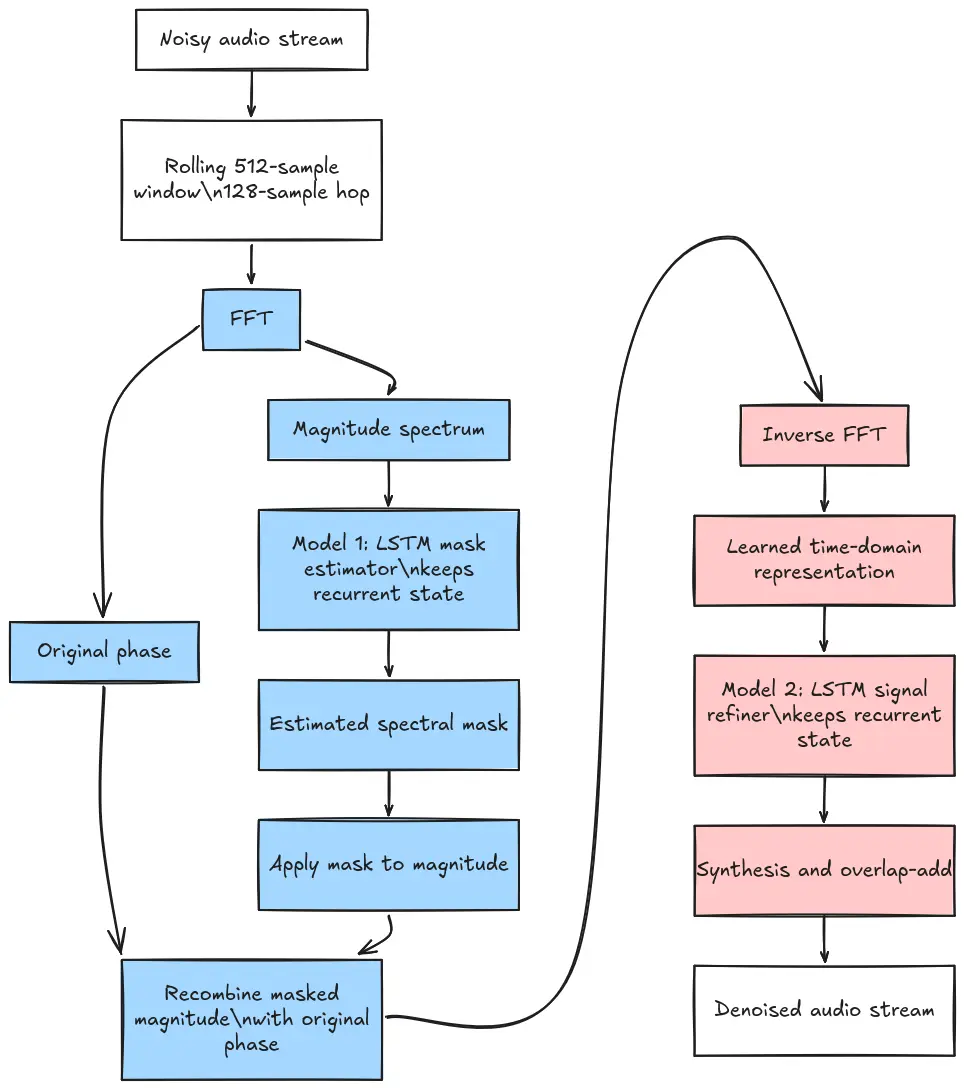
At a high level, the processing pipeline is:
- keep a rolling input window;
- compute an FFT and extract the magnitude spectrum;
- run the first model to estimate a mask;
- combine the mask with the original phase and run an inverse FFT;
- run the second model to refine the signal in the time domain;
- keep recurrent states between frames;
- reconstruct the output with overlap-add.
The following diagram is a simplified view of one DTLN frame. The important point is the two-stage structure: the first recurrent model estimates a frequency-domain mask, then the second recurrent model refines the signal in a learned time-domain representation.
The model is small enough to be a credible browser target. The paper reports less than one million parameters, trained on 500 hours of noisy speech, and a real-time frame-in/frame-out design. That made it a good candidate for a client-side WebRTC experiment: not trivial, but plausibly feasible.
The original project provides TensorFlow models and a reference implementation:
TensorFlow is excellent for research and training, but it is not the runtime we want inside an AudioWorklet. The question became: can we keep the DTLN model quality while finding a browser runtime that meets real-time constraints?
Standing on previous work: Sirius AI Tech and Datadog
We did not start from zero.
Sirius AI Tech, through Hayati Ali Keles, had already published a Rust implementation:
That project ports the DTLN algorithm to Rust and uses TensorFlow Lite models converted from the original TensorFlow artifacts. It targets Node and native execution, and reports performance far above real time in that environment. The repository also shows the beginning of a browser/WebAssembly direction.
Datadog then published a detailed engineering article about building a real-time client-side noise suppression library:
Their work wrapped the same broad idea into a Rust/TensorFlow Lite core that could target native clients, Node.js, and WebAssembly. The browser integration was important for us because it proved that DTLN could be embedded in a web application at all. It also exposed an API shape that was useful to preserve:
dtln_create()dtln_denoise()dtln_stop()dtln_destroy()
So our starting point was not “can DTLN denoise speech?” The starting point was more precise: can we make this practical for a normal browser WebRTC app, with a package that is easy to install and does not require each consumer to understand TensorFlow Lite, WebAssembly bootstrapping, model files, or Web Audio threading?
The real-time budget: 32 ms per frame
The first hard constraint comes from the audio frame size.
Our DTLN path processes 512 samples at a 16 kHz sample rate. That represents 32 ms of audio:
512 samples / 16,000 samples per second = 0.032 sTherefore, a dtln_denoise() call processing that frame must complete in less than 32 ms to avoid falling behind. In practice, it needs margin below that limit. If the average is near 32 ms, any p95 or p99 spike will accumulate delay or produce audible glitches.
When we tested the Rust/WASM browser backend, we measured the following on a Dell XPS 15 9500 with an Intel Core i7-10750H CPU:
| Runtime path | Mean dtln_denoise(512) | p95 dtln_denoise(512) | Result |
|---|---|---|---|
| Rust/WASM browser backend | 32.11 ms | 37.40 ms | Missed real-time budget |
| Required budget | < 32 ms | < 32 ms | Needed for sustained real-time processing |
That explains the user symptoms we observed when integrating this path in WorkAdventure: for some users the feature worked, but for others audio delay grew over time or clicking sounds appeared. The implementation was not catastrophically slow. It was worse: it was just slow enough to fail under real conditions.
First attempt: optimize the Rust/WASM path
Our first research direction was conservative: keep the existing Rust/WASM architecture and optimize the hot path.
We found several useful improvements:
- reuse FFT plans and scratch buffers instead of rebuilding them per call;
- remove redundant phase reconstruction in the masking path;
- reduce JavaScript/WASM buffer-copy overhead in the browser wrapper.
Those changes improved the implementation, but they did not change the central result. The dominant cost was browser-side inference, not the surrounding FFT and buffer management. Optimizing the Rust code and the JS/WASM boundary was not enough to move p95 safely below 32 ms.
This was an important negative result. It told us that the problem was not a small inefficiency in our DTLN orchestration. The runtime stack itself was the wrong one for the browser.
The likely explanation is the difference between native TensorFlow Lite and the browser WebAssembly environment. In Node or native code, the TensorFlow Lite C API can use a CPU-optimized implementation with platform capabilities such as SIMD, threads, and sometimes accelerator delegates. In the browser path we tested, inference ran through a more constrained WebAssembly stack. The performance cliff was concentrated in model execution.
Looking for a better inference stack
The next question was whether a modern browser inference runtime could run the same DTLN models fast enough.
We evaluated two candidates:
- LiteRT.js, the modern successor of TensorFlow Lite for JavaScript/web use cases;
- ONNX Runtime Web, Microsoft’s browser runtime for ONNX models.
Both were promising in the main browser context. The key result was that modern browser inference was not the bottleneck anymore: we could run DTLN-style model inference in the range of a few milliseconds on the main thread.
For LiteRT.js, using the same .tflite models and the same DTLN control flow, we measured:
| Runtime path | Mean dtln_denoise(512) | p95 dtln_denoise(512) |
|---|---|---|
| Rust/WASM browser backend | 32.11 ms | 37.40 ms |
| LiteRT.js browser backend | 4.26 ms | 6.10 ms |
The maximum absolute output difference between the Rust/WASM browser backend and the LiteRT.js browser backend was about 9.69e-8, which was small enough to indicate that we had changed the runtime, not the algorithm.
Profiling also showed where time was spent:
| Stage | Approximate share |
|---|---|
| second model invocation | 44% |
| first model invocation | 37% |
| FFT, magnitude extraction, and inverse FFT combined | 4% |
This confirmed that inference runtime choice mattered more than further FFT micro-optimization.
LiteRT.js also benefited from browser threads when the page was cross-origin-isolated:
| LiteRT.js mode | Mean of benchmark round means |
|---|---|
| Single-threaded under cross-origin isolation | 3.85 ms |
| Threaded under cross-origin isolation | 2.63 ms |
That is roughly a 1.46x improvement from threading.
At this point, the main-thread benchmark was encouraging but not sufficient. Real-time WebRTC audio processing should not depend on the main thread. The main thread can be blocked by layout, JavaScript, React/Svelte updates, maps, iframes, or user code. If inference runs there, a UI stall becomes an audio glitch.
For real-time audio, the natural browser primitive is AudioWorklet.
Why AudioWorklet changed the problem
An AudioWorkletProcessor runs in AudioWorkletGlobalScope, on the Web Audio rendering side. That is exactly where a real-time denoiser should live, but the environment is intentionally constrained:
- no
document; - no normal
windowglobal; - no dynamic
import()inside the worklet global scope; - no
importScripts(); - synchronous
process(...)callbacks; - small per-callback timing budget;
- processor code loaded through
audioContext.audioWorklet.addModule(...).
These constraints matter because many browser ML libraries assume they can bootstrap themselves like ordinary page code. They may inject scripts into the DOM, use worker-style APIs, resolve files from URLs, or expose asynchronous model invocation APIs. Those assumptions are fine in a page, but not in an audio render callback.
ONNX Runtime Web had a very direct warning sign for this use case: issue #13072, opened in 2022, is specifically about running ONNX Runtime in an audio worklet and was still open when we checked it.
LiteRT.js did not work out of the box either. Our validation showed that simple worklet modules loaded correctly, fft.js loaded correctly, and importing @litertjs/core itself loaded correctly. The failure happened when LiteRT.js tried to initialize its WebAssembly runtime. The loader path expected DOM script injection or worker-style loading; inside AudioWorkletGlobalScope, Chrome reported:
ReferenceError: document is not definedThat was the turning point. We had found a fast inference runtime, but the browser environment we actually needed was not supported by its loader.
Forking LiteRT.js for the worklet path
We first created a repository-local LiteRT fork to answer a narrow question: could LiteRT.js be made to run DTLN inside an AudioWorkletProcessor at all?
The first fork proved the concept. It bundled LiteRT loader code, WebAssembly bytes, and DTLN model bytes, then initialized the runtime inside the worklet. That approach worked, but it required evaluating generated JavaScript source in the processor. It was acceptable as a research prototype, but fragile under content security policies and not a good long-term package boundary.
We then moved to an ESM-oriented LiteRT fork. The current worklet path vendors LiteRT ESM artifacts and statically imports the generated Emscripten module factory. In the intended upstream package shape, that looks like this:
import createLiteRtWasm from "@litertjs/core/wasm/litert_wasm_internal.mjs"The important architectural change is that the worklet bundle owns the required bytes:
- the LiteRT WebAssembly binary;
- the first DTLN
.tflitemodel; - the second DTLN
.tflitemodel.
Instead of asking the worklet to discover URLs or fetch files dynamically, Vite bundles those files as Uint8Array imports. The processor passes the WebAssembly bytes to the Emscripten module factory through wasmBinary, avoiding URL-based Wasm discovery inside the worklet.
We still need a small compatibility shim because Chrome’s AudioWorkletGlobalScope does not expose every global assumed by the generated LiteRT/Emscripten glue. The shim provides missing pieces such as self, location, URL, and TextDecoder only when necessary.
The public LiteRT SignatureRunner.run(...) API is asynchronous. That is a bad fit for AudioWorkletProcessor.process(...), which cannot await without breaking the render contract. For that reason, our runtime still depends on an internal synchronous LiteRT runner path. If LiteRT ever returns a real promise there, we fail explicitly instead of silently introducing an invalid async audio pipeline.
This fork is not intended to remain private forever. We opened an upstream LiteRT pull request to make the useful part available to the broader ecosystem:
At the time of writing, this PR is open and proposes support for Emscripten ES modules in the LiteRT.js loader.
Packaging the result as a browser library
Once the browser runtime strategy changed, the repository shape had to change too.
The original codebase still carried the history of a mixed package:
- Rust sources;
- Cargo metadata;
- native Node addon wrappers;
- Emscripten-specific scripts;
- Docker/static native build documentation;
- mixed browser/Node package metadata.
That no longer matched the product we were building. The useful deliverable was a browser package for frontend applications. We therefore converted the project into:
@workadventure/noise-suppression;- browser-only;
- ESM-only;
- built with Vite;
- distributed with the DTLN models and LiteRT assets;
- exposing a high-level
AudioWorkletintegration API.
The main WebRTC path now looks like this:
import {
  createNoiseSuppressionAudioWorklet,
} from "@workadventure/noise-suppression/audio-worklet";

const microphoneStream = await navigator.mediaDevices.getUserMedia({
  audio: {
    channelCount: 1,
    echoCancellation: true,
    noiseSuppression: false,
    autoGainControl: true,
  },
});

const context = new AudioContext({ sampleRate: 16000 });
await context.resume();

const source = context.createMediaStreamSource(microphoneStream);
const destination = context.createMediaStreamDestination();

const worklet = await createNoiseSuppressionAudioWorklet(context, {
  bypassUntilReady: true,
});

source.connect(worklet.node).connect(destination);
await worklet.ready;

const [processedTrack] = destination.stream.getAudioTracks()
The package consumer should not need to host separate model files, find the right LiteRT WebAssembly binary, or manually construct the worklet processor URL. That is deliberate. The research problem was not only “make DTLN run.” It was “make DTLN usable by a web developer who wants to improve a WebRTC track.”
Correcting the AudioWorklet buffering model
Our first worklet benchmark produced very encouraging numbers, but it also revealed a semantic mistake in the processor design.
Browsers typically call AudioWorkletProcessor.process(...) with 128 audio frames per render quantum. DTLN, in our runtime, is organized around a 512-sample frame. The first implementation called dtln_denoise() directly from each render callback, effectively timing and processing the wrong unit.
Chrome’s AudioWorklet design guidance describes the standard solution for this kind of mismatch: use ring buffers. The processor must adapt the browser’s render quantum to the algorithm’s block size.
The corrected processor now does the following:
- push the current input quantum into an input ring buffer;
- when at least
512input samples are available, pull one DTLN frame; - run synchronous
dtln_denoise(512); - push the
512processed samples into an output ring buffer; - drain the output ring buffer back into the current
128-sample render quantum; - output silence until enough denoised samples are available.
This introduces a small and intentional startup delay: the processor needs four 128-sample render quanta to assemble one 512-sample DTLN frame. That is the correct tradeoff. It preserves the model contract instead of pretending that partial frames are equivalent to full DTLN frames.
After this correction, we reran the benchmark from inside the worklet. A fresh sanity check on the current package, using Playwright-managed Chromium against the Vite benchmark page, produced the following across five repeated single-threaded rounds of 300 measured calls each:
| Measurement | Value |
|---|---|
| Render quantum | 128 samples |
| Denoise frame | 512 samples |
| Initialization, after dev server warmup | 355.030 ms to 377.415 ms |
Mean dtln_denoise(512), per round | 4.310 ms to 6.040 ms |
| Mean of round means | 5.243 ms |
p95 dtln_denoise(512) | 9.000 ms |
| Minimum | 2.000 ms |
| Maximum | 13.000 ms |
These numbers are comfortably below the 32 ms real-time frame budget.
There is one measurement limitation worth stating explicitly: performance.now() was not available inside the AudioWorkletGlobalScope in our Chrome test environment, even with the page served under COOP/COEP. The worklet benchmark therefore used Date.now(), which has coarser granularity. That is why the result should be read as an integration benchmark, not a microbenchmark with sub-millisecond precision.
Why not run inference in a Web Worker?
There is another architecture that is probably better for applications that can enable cross-origin isolation: keep the AudioWorklet in the audio graph, but move inference to a dedicated worker and connect both sides with SharedArrayBuffer.
Google describes this pattern in WebAudio Powerhouse: Audio Worklet and SharedArrayBuffer. The idea is to avoid using MessagePort as the data path for every audio quantum. MessagePort is useful for control messages, but repeated audio-buffer messages create allocations and scheduling latency. Instead, the application allocates shared memory once, then both the worklet and the worker read and write into it.
In that architecture, the AudioWorkletProcessor remains responsible for the real-time Web Audio contract. Every render quantum, it reads microphone samples, writes them into an input SharedArrayBuffer, consumes processed samples from an output SharedArrayBuffer, and updates a small shared state buffer. The worker waits on that state buffer with Atomics, wakes up when more work is available, runs the denoiser, writes processed audio back, updates the shared indexes, and goes back to sleep.
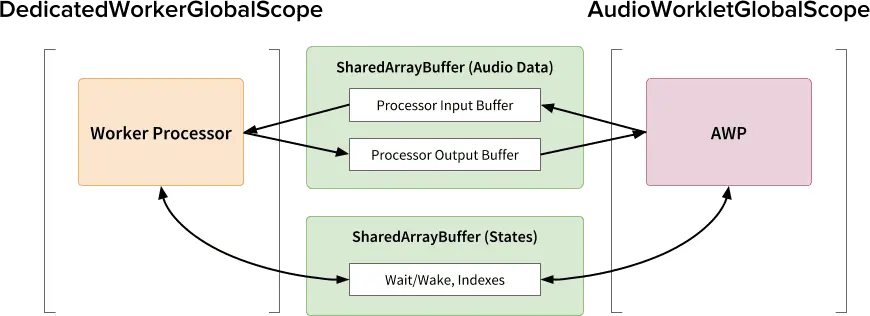
The important detail is that the worklet should not synchronously wait for the worker. The audio callback must keep returning on time. If the worker is late, the output ring buffer may underflow and the worklet may have to output silence or reuse existing data, but the audio thread is not blocked by inference.
For users who can enable COOP/COEP, this is probably the best long-term architecture. The worker environment is less constrained than AudioWorkletGlobalScope, so it is easier to use a full inference runtime there. It also opens the door to performance options that are difficult or impossible in our current bundled worklet path: multi-threaded WebAssembly, runtime-specific worker pools, or even GPU-backed inference through WebGPU when the selected runtime and browser support it.
For WorkAdventure, however, it has a major deployment problem: SharedArrayBuffer requires cross-origin isolation. In practice, that means COOP/COEP headers. COEP is recursive: third-party content embedded in iframes must also satisfy the policy or be loaded in a compatible way.
That is a hard requirement for WorkAdventure because maps can contain many third-party embedded websites and co-websites. Requiring all of them to emit the right CORP/CORS/COEP headers would break many existing worlds.
Credentialless iframes can relax part of that problem, but they come with their own tradeoffs: ephemeral storage, no access to regular cookies/localStorage, and limited browser availability. MDN still marks iframe credentialless as experimental and not Baseline.
So we rejected the worker plus SharedArrayBuffer architecture for now. It is technically attractive, but operationally too expensive for the kind of web applications WorkAdventure needs to support.
Adding tests because browser-only code needs browser tests
Once the package depended on WebAssembly loading, LiteRT initialization, AudioContext, and AudioWorklet, Node-only tests were no longer sufficient.
We added browser automation with Vitest Browser Mode and Playwright. The initial tests are smoke/integration tests rather than performance tests:
- initialize the normal browser runtime;
- run
dtln_create()/dtln_denoise()/dtln_stop(); - initialize the
AudioWorkletruntime; - observe the ready and processing-started messages.
This gives CI a signal for the regressions that matter most: packaged assets not loading, LiteRT failing to initialize, worklet registration breaking, or the processor failing to process audio after setup.
Performance remains validated through dedicated benchmark pages because browser timing measurements are sensitive to machine, browser, isolation mode, and measurement API.
Where we ended up
The current package is intentionally narrower than the projects we started from. It does not try to be a native DTLN runtime, a Node addon, or a general machine learning toolkit. It is a browser library for real-time WebRTC noise suppression.
The final architecture is:
- DTLN models converted to TensorFlow Lite format;
- LiteRT.js as the browser inference runtime;
- a LiteRT ESM fork for worklet-safe WebAssembly loading;
- a synchronous DTLN frame API internally;
- an
AudioWorkletprocessor for real-time Web Audio integration; - input/output ring buffers to adapt
128-sample render quanta to512-sample DTLN frames; - Vite-based packaging with bundled model and Wasm bytes;
- browser smoke tests for the page runtime and worklet runtime.
The most important benchmark progression was:
| Step | Mean | p95 | Interpretation |
|---|---|---|---|
| Rust/WASM browser backend | 32.11 ms | 37.40 ms | Too close to or above real time |
| LiteRT.js page runtime | 4.26 ms | 6.10 ms | Inference stack solved the speed problem |
| Corrected AudioWorklet runtime | 4.31-6.04 ms | 9.00 ms | Worklet path stayed within budget |
The work also produced several negative results that were just as important as the final implementation:
- optimizing the Rust/WASM browser path was not enough;
- main-thread inference was fast but architecturally fragile for real-time audio;
- stock LiteRT.js could not initialize inside
AudioWorkletGlobalScope; - ONNX Runtime Web had an open worklet compatibility issue;
- a worker plus
SharedArrayBufferdesign was incompatible with our iframe-heavy deployment constraints; - the first worklet benchmark was invalidated by the
128vs512frame-size mismatch.
These are the kinds of results that do not appear in a simple package README, but they drove the design.
Conclusion
The main outcome of this project is not a new noise suppression model. DTLN already existed. Rust ports existed. Browser/WebAssembly experiments existed.
The contribution was to make the model usable in the specific environment where we needed it: real-time WebRTC audio in a normal browser application.
That required research across several layers:
- audio model behavior;
- inference runtime performance;
- WebAssembly loading;
AudioWorkletGlobalScoperestrictions;- Web Audio block-size adaptation;
- browser security headers;
- frontend package distribution;
- automated browser validation.
The result is a package that hides most of that complexity behind a small API, while still keeping the architecture explicit enough to be inspected, benchmarked and improved.
For web developers, that is the practical lesson: high-quality browser audio features are rarely only about choosing a model. The hard part is making the model fit the browser’s real-time execution model without constraining every application into supporting COOP/COEP headers.