
In short
- Since August 17th, 2026, screen sharing and video calls are suspended on Discord in Brazil, following an order from the ANPD, Brazil’s data protection authority. Voice channels, chat and direct messages still work.
- Discord says the suspension is temporary. Nobody knows how long it will last.
- If you used Discord to share your screen and get work done — pair programming, classes, design reviews, co-working — WorkAdventure gives you screen sharing, video and voice in the browser, with no download, free for up to 10 users.
What happened
On August 17th, Discord suspended screen sharing and video calls for its users in Brazil, complying with a preventive order from the ANPD (Autoridade Nacional de Proteção de Dados) issued in the context of a serious ongoing investigation. Everything else on Discord keeps working in Brazil: voice channels, chat, direct messages.
Discord says it is working with the authority to restore the features “as quickly as possible”. That may mean days, or months — there is no announced date.
We are not here to comment on the order or on the investigation behind it. But if screen sharing was part of how you work every day, “temporary and indefinite” is not an answer you can plan around. Here is one you can.
What Discord users actually lost
For a lot of teams, communities and classrooms in Brazil, Discord was not a gaming app — it was the office:
- Pair programming and code reviews over Go Live
- Classes and workshops where the teacher streams a screen
- Design and document reviews in a voice channel
- Co-working: sitting together in a channel, sharing a screen when needed
All of that has one thing in common: it needs screen sharing plus voice plus presence — the feeling that your people are around, not a scheduled meeting link.
WorkAdventure in two minutes
WorkAdventure is a virtual office that runs entirely in the browser. Your team gets a 2D world — an office, a campus, a village — where everyone is a small avatar. Walk up to a colleague and a bubble opens: video, voice, and screen sharing, instantly. Walk away and the conversation closes. Step into a meeting room and everyone inside is in the same call.
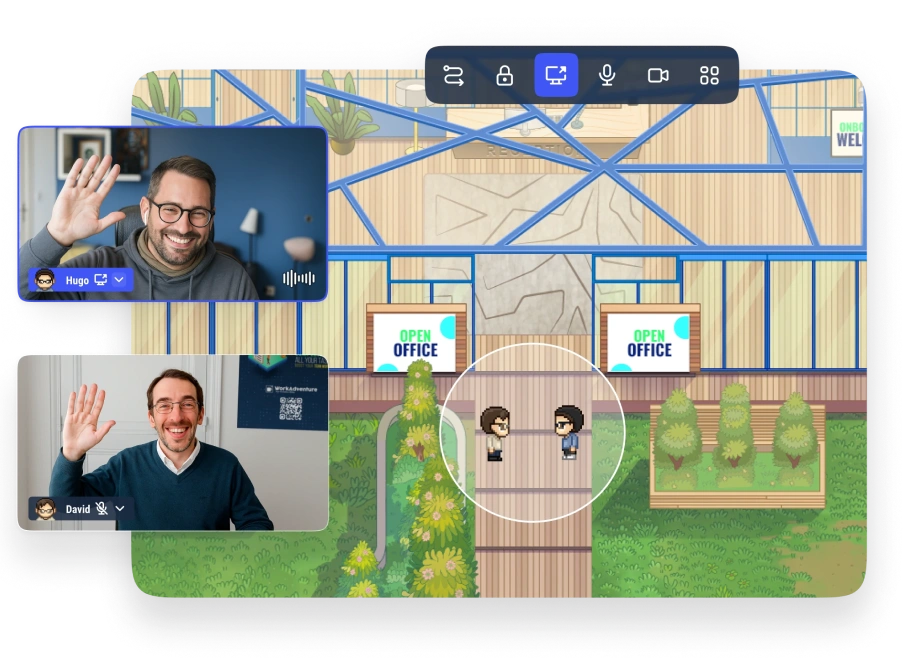
For someone coming from Discord, the mapping is simple:
| On Discord | On WorkAdventure |
|---|---|
| A server | A world — your persistent map |
| A voice channel | A meeting area, or just standing next to someone |
| Go Live / screen share | Screen sharing in any conversation — several people can share at the same time |
| An invite link | An invite link — nothing to install, it opens in the browser |
And a few things Discord never gave you:
- Presence you can see. You see who is at their desk, who is in a meeting, who is chatting at the coffee machine — before you interrupt anyone.
- No download, no installation. Your guests click a link and they are in. That matters for classes, clients and communities.
- Open source and self-hostable. WorkAdventure is open source. If your organization needs its data on its own servers, in its own country, you can run it yourself.
Getting started takes five minutes
- Create your space — it is free for up to 10 users, no credit card.
- Pick an office map, or start from a template and make it yours.
- Share the link with your team, the way you would share a Discord invite.
That is the whole migration. There is no server to configure and nothing for your teammates to install.
And when Discord comes back?
It probably will — Discord says the suspension is temporary, and we hope the situation is resolved soon. Keep your Discord server for your community; many teams do both, and our side-by-side comparison of Discord and WorkAdventure is about deciding which conversations belong where. But once you have worked a few days in a space where you can see your team around you, share three screens side by side in a meeting, and bring anyone in with a single browser link, you may find the virtual office is not the backup plan. It is the upgrade.