Discord vs WorkAdventure
Discord is a closed persistent community platform. WorkAdventure is an open live space available in your browser. Here is the honest comparison.
Try WorkAdventure freeFree for 10 concurrent users · No download · No account for guests
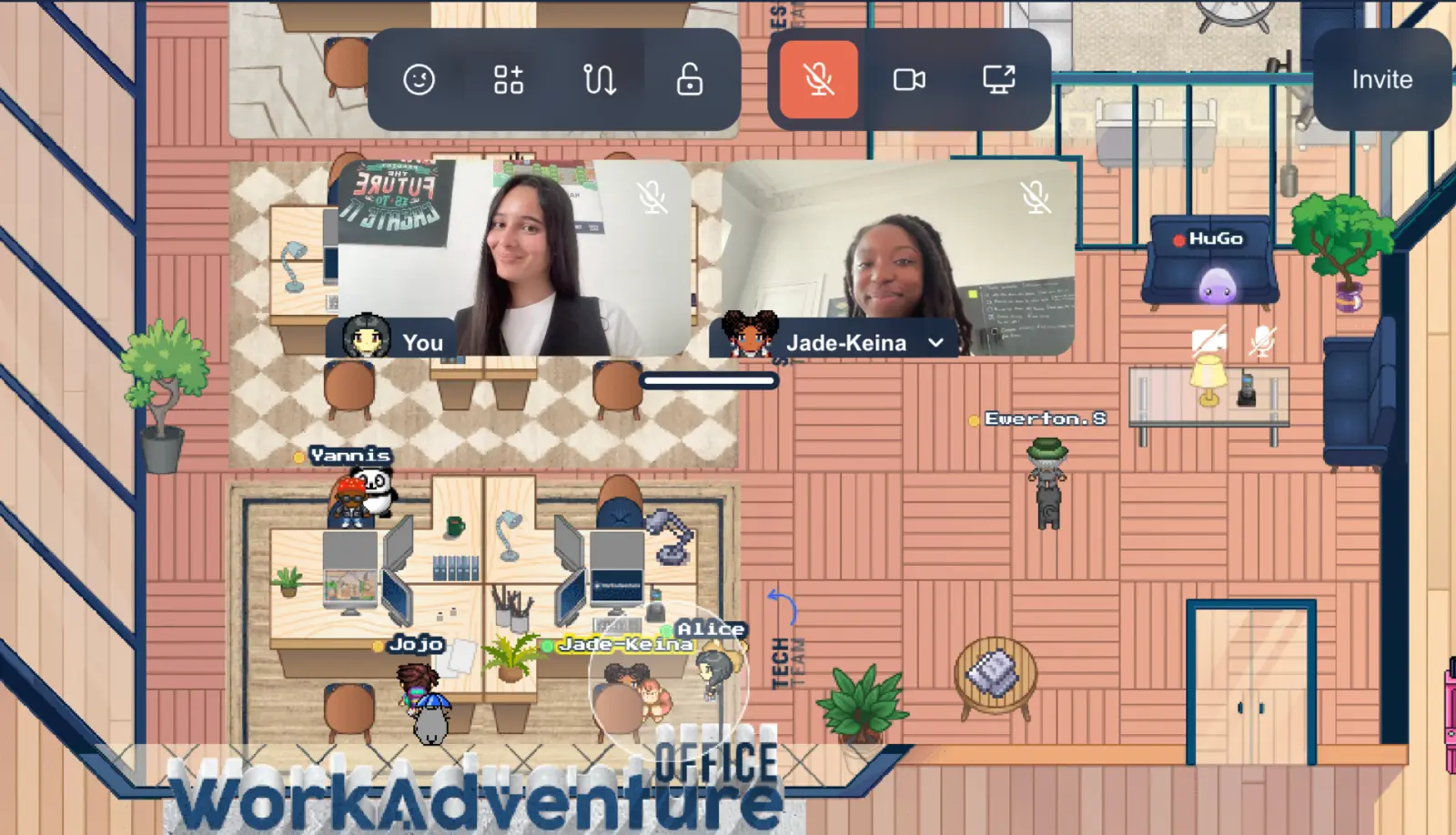


























Two products built on different assumptions
Discord is a persistent community platform. A server exists whether anyone is online or not. Channels accumulate history, roles and moderation rules, voice channels stay open so people drop in and out without scheduling anything, it works well on mobile, and it costs nothing for an unlimited number of members.
WorkAdventure is a real time virtual space. You open a map, you move an avatar, and a conversation starts when you walk up to someone. You don’t even have to create an account. Presence is spatial rather than listed: you see where people are, who is talking to whom, and which meeting room is occupied. It is built around a session, a working day or an event.
That difference explains most of what follows. Discord optimises for a community that exists asynchronously. WorkAdventure optimises for the feeling of being in the same room at the same time.
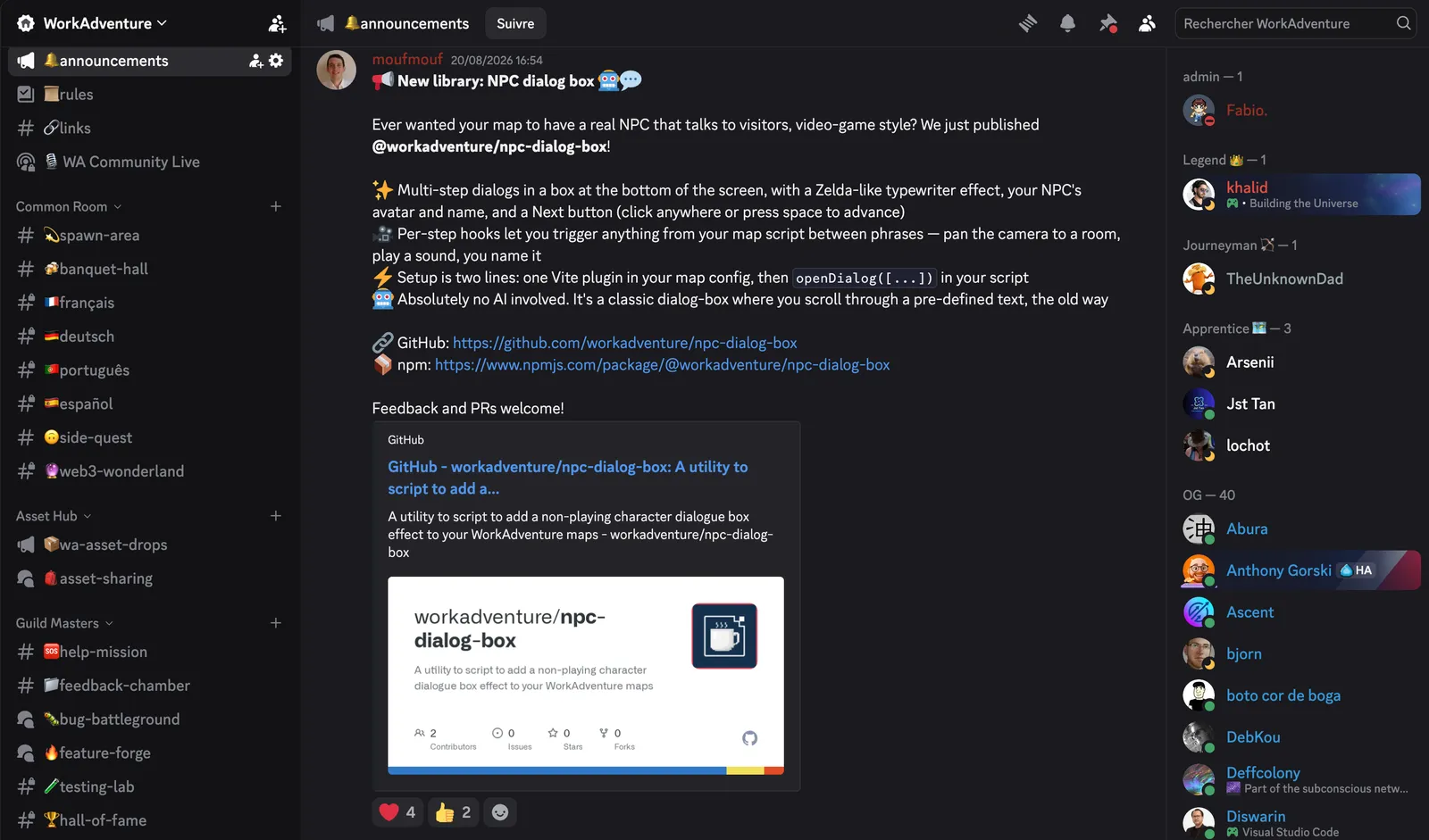
Discord: a gaming application with a professional look
While Discord has many use cases, its origins stem from an application that make it easy for gamers to communicate. You start an audio session by joining a room and put Discord in the background.
Despite being targetted at gamers, the application look’n’feel is quite professional: channels are presented as lists and messages like in any chat application.
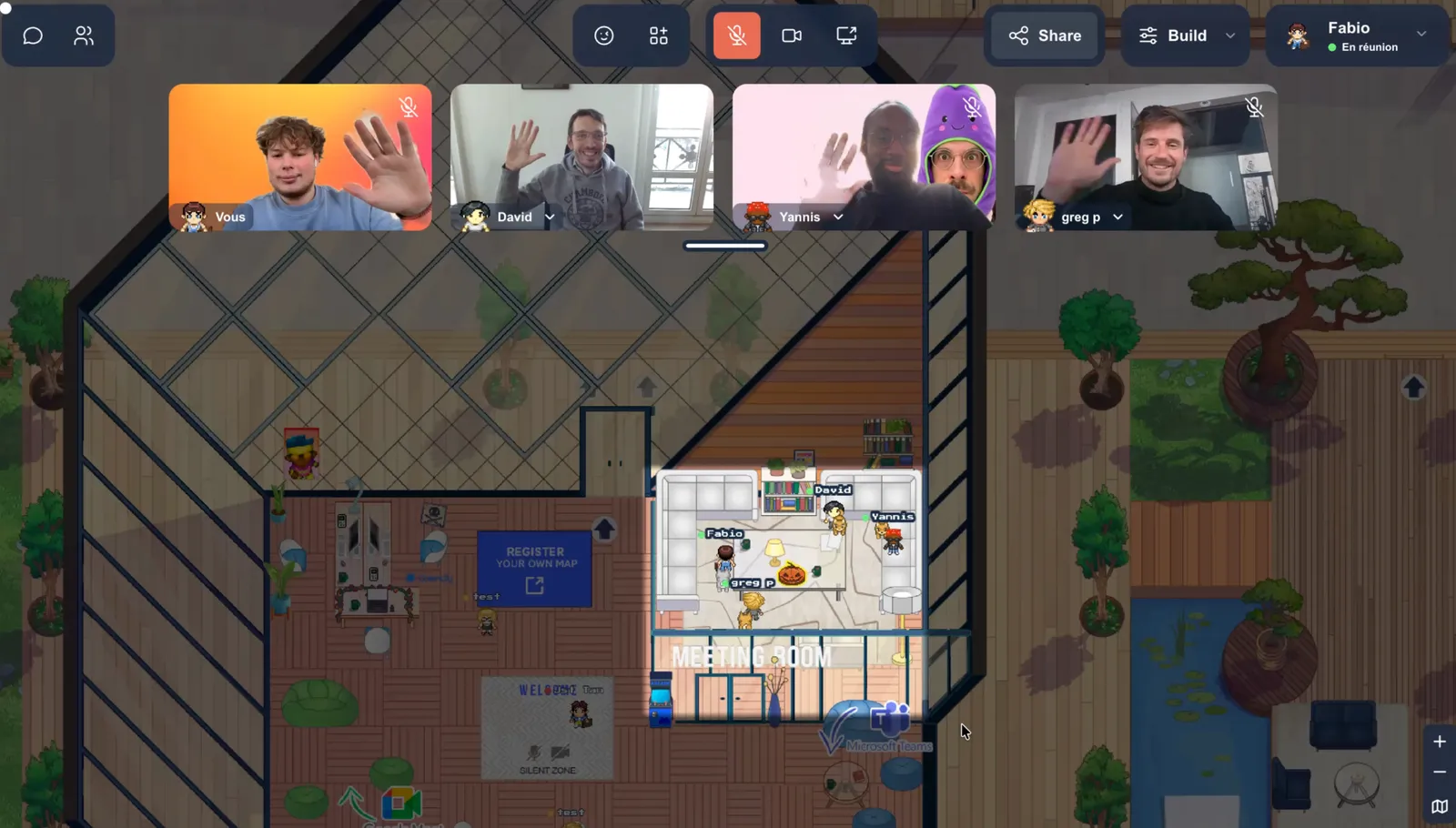
WorkAdventure: a professional application with a video-game look
By opposition, WorkAdventure might look like a video game, but it was targetted from the ground to be used by companies.
Having a spatial organization of your office or your event allows for seemless interaction between colleagues. No need to join a channel to be heard, you simply walk next to your colleagues and they hear you. Groups are dynamically created and deleted as you move around.
Persistence is the real structural difference
On Discord everything is archived by default, and a message posted three years ago is still searchable. That is why a server becomes a knowledge base almost by accident.
WorkAdventure splits this in two. Proximity chat, the text that appears inside a conversation bubble, is not stored at all: people who join a bubble cannot see what was said before they arrived. Persistent chat rooms exist separately, so a team can keep durable channels alongside the ephemeral ones. Those exist but are not the default. The default in WorkAdventure is talking in video chats. Text messages are usually the fallback.
Source code, license and self-hosting
Discord is proprietary and hosted, which is a perfectly good model: nothing to run, nothing to upgrade, no ops team.
WorkAdventure is published both as a hosted solution and also as on self-hostable platform: its source is on GitHub. The hosted solution gives you the easiness of usage. Self-hosting gives you the control. You can install it, read it, change it and run it yourself. No-one can take away from you a self-hosted install.
Discord and WorkAdventure, side by side
Neither column is all ticks. That is the point.
WorkAdventure
- Yes. Runs in a browser tab, with nothing to install
- Yes. Several shared screens visible at the same time, in one bubble or meeting room
- Yes. Meeting rooms sized by the conversation, and podium areas once the group becomes an audience
- Yes. Spatial presence: you see who is talking to whom, and which room is busy
- Yes. Source available on GitHub, AGPL v3 with the Commons Clause
- Yes. Self-hosting permitted
- No. Free plan capped at 10 concurrent users
- No. No searchable history of proximity conversations


Discord
- Yes. Free for an unlimited number of members
- Yes. Everything archived and searchable by default
- Yes. Strong mobile app, on phones people already have
- Yes. Roles, moderation and bots built for large communities
- Yes. Up to 50 people can share video or a screen at once in a voice chat
- No. You watch one stream at a time, and joining another voice channel drops it
- No. A Go Live stream caps at 50 concurrent viewers plus the broadcaster
- No. Proprietary, and no self-hosting
- No. Requires an account
Screen sharing on Discord is suspended in Brazil since 17 August 2026
Brazil’s data protection authority, the ANPD, opened an enforcement procedure against Discord on 7 August 2026 under the country’s digital child protection statute. Discord suspended the video and sharing features on 17 August 2026.
Suddenly, many teams using Discord for work lost their communication tool.
This highlights the weaknesses of using closed platform. Having the option to transition from an hosted platform to a self-hosted one would have been key for those teams, but sadly, they don’t have this option with a closed source solution. The full story is in the article.
When Discord is the better tool. If your group is primarily a community rather than a team, Discord is hard to beat. A gaming clan, an open source project with thousands of contributors, a fan server or a study group living on asynchronous chat all need what Discord does well: free scale, searchable history, granular roles, bots, and a mobile app people already have on their phone. If most of your members take part from a phone, Discord's native app is the more comfortable place to be, even though WorkAdventure installs on a phone as a PWA. And if what you need is one person broadcasting to a passive audience, Discord's model fits that shape directly.
When WorkAdventure is the better tool. The case is strongest when you use the tool for work or events. Pair programming, design reviews, teaching a small class, running a workshop, onboarding a new colleague: situations where two or three people need to show things to each other, interrupt each other, and move between small groups without creating a new meeting link every time. It is also the better answer when the people joining are outside your organisation, because a browser link with nothing to install removes a real barrier for candidates, students, clients and partners on locked down machines.
The question underneath the comparison. Any capability you depend on but do not control can be removed, by a regulator, by a pricing decision or by a change of strategy. That is not an argument against Discord, which remains an excellent tool for what it was built to do. It is an argument for knowing in advance which of your workflows would break, and how fast you could move them somewhere else. For most groups the practical answer is not to replace one tool with the other, but to be clear about which conversations belong in a persistent community platform and which belong in a live shared space.
Our clients say it better
Read the many opinions and comments about our products and services from different companies and institutions.

Gamified learning: How Univaq is revolutionizing education with WorkAdventure

Event, learning and working space: all in one customized map

Digital campus: Why the University of Rennes ditched Gather for WorkAdventure

An innovative, high-impact platform! Feedback from our employees was unanimous: they loved this new way of presenting our new galenic products! WorkAdventure has brought freshness and novelty to the various projects and innovations presented via the platform. A total success!
 Amelie Quinquenel Head of Internal Communications at ARKO Pharma


Open-Source
WorkAdventure's code is available to anyone on GitHub! You can download and modify it to create your own self-hosted virtual world on your own server.
GitHub repository
GDPR Compliant
Security and data protection are paramount—for you and for us. We comply fully with the GDPR: no unnecessary data are stored, and 100% of our services are hosted in the EU.
Privacy policy
Still have questions?
Can't find the answer you're looking for? Please chat to our friendly team.
Rethinking the way we work
Insights, stories, and tools to shape the future of hybrid work and virtual collaboration.