
Since WorkAdventure 1.34, your world can tell other systems what happens in it: a recording is ready, a visitor registered, someone changed their consent. Until now, though, catching those webhooks took a developer, or a fair amount of copying and pasting between the WorkAdventure admin and your automation tool.
Today, WorkAdventure plugs straight into the two most popular automation tools:
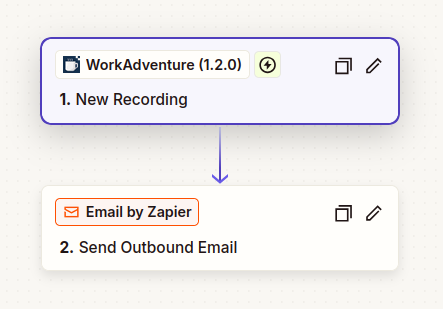
- Zapier gets four new triggers: New Recording, New Visitor, New Consent Decision and New Member Connection.
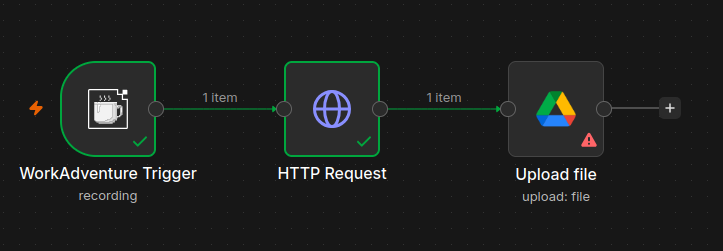
- n8n gets a WorkAdventure node: the same member actions as in Zapier, plus a trigger for every event your world sends.
In both, you pick an event and turn the workflow on. That’s it: no URL to copy into WorkAdventure, no secret to paste back. Your world can now talk to the thousands of apps that Zapier and n8n connect to.
What can start a workflow
| Something happens in your world | Zapier trigger | n8n trigger event | For instance |
|---|---|---|---|
| A meeting recording is ready | New Recording | Recording Completed | Archive it, send it to the participants |
| A visitor signs up | New Visitor | Visitor Registered | Add them to your CRM |
| Someone gives, refuses or withdraws a consent | New Consent Decision | Consent Changed | Keep your mailing lists in line |
| A member or a visitor connects | New Member Connection | Member Connecting | Notify the team, update their access |
| Raw analytics events (experimental) | — | Analytics | Feed your own dashboards |
Both tools can also act on WorkAdventure: create, update, find, list and delete members. Put the two together and a workflow can react to an event, then change the member behind it.
Four things you can automate today
Archive every meeting recording
Recording a meeting takes one click in WorkAdventure. Finding it again three weeks later should be just as easy. With New Recording, copy each recording to Google Drive, Dropbox or SharePoint, and email the link to the person who recorded it.
The event carries a download link, the room, the name and email of the person who recorded, the duration and the size. Copy the file, not the link: the link is valid for 7 days, and WorkAdventure deletes recordings after three months.
Every new visitor in your CRM, with their consent
If you use your virtual space as a lead magnet, every visitor who registers is a lead. New Visitor creates the contact in HubSpot, Pipedrive, Brevo or Salesforce as soon as the account is usable: right away for people who sign in with SSO, once the email is verified for people who use the registration form.
Consent comes on its own, with New Consent Decision: one event per purpose (newsletter, events, surveys…), each
time someone grants, refuses or withdraws it. Subscribe the contact to your newsletter when they grant newsletter,
and unsubscribe them as soon as they don’t. Your mailing list then follows what people actually agreed to, without a
weekly CSV export.
NOTE
Sending visitors to a CRM is a transfer of personal data to a third party. Declare it in your world’s privacy policy.
Tell the team when a guest arrives
New Member Connection fires each time someone connects to your world. Post “Alice from Acme just arrived” in the sales channel on Slack or Microsoft Teams, log attendance to a training session in a Google Sheet, or count visits on the CRM contact. The event fires on every connection, so update the contact rather than creating a new one each time.
Give people the right access as they arrive
This one only works in n8n, and it is the most powerful of the four. When someone connects, WorkAdventure waits up to 5 seconds for your workflow before letting them in. In n8n, set the trigger’s Respond option to When Last Node Finishes, look the person up in your HR tool or in a Google Sheet, and update their tags with the WorkAdventure node. The new tags apply to this very connection: a new hire walks into their team’s rooms on day one, and someone who left a project no longer gets into its meeting room.
Zapier answers WorkAdventure immediately, so a zap runs once the member is already in. That is perfect for notifications and logs, but too late to change their access for this visit.
Set it up in Zapier
- In the WorkAdventure admin, open Developers › API keys / Zapier, create an API token and enable the Inbound API. The page lists everything Zapier will ask for.
- In Zapier, create a zap, choose WorkAdventure as the trigger app and pick one of the four triggers. Connect your account with the token and your world slug.
- Test the trigger. Zapier shows a sample event, so you can map its fields in the next steps before anything happens in your world.
- Turn the zap on.
Set it up in n8n
- Install the WorkAdventure node: search for it in the nodes panel on n8n Cloud, or install
@workadventure/n8n-nodes-workadventurefrom Settings › Community Nodes on your own n8n. - Create a WorkAdventure API credential with the same token and world slug.
- Add a WorkAdventure Trigger node and tick the events you want.
- Click Listen for test event in n8n, then Test on the webhook’s page in the WorkAdventure admin. A sample event reaches your workflow. Activate the workflow when it does what you want.
The details are in the n8n documentation.
For developers
What Zapier and n8n do, your own code can do too. The Inbound API now manages the webhooks of your world. Create one with a URL and the events you want, and the response carries the secret that signs its deliveries:
curl -X POST https://admin.workadventu.re/api/v1/worlds/<world-slug>/webhooks \
  -H "Authorization: <your API token>" \
  -H "Content-Type: application/json" \
  -d '{"url": "https://example.com/workadventure", "events": ["recording", "visitor"]}'
Delete it with DELETE …/webhooks/<id> when you no longer need it. Deliveries follow the
Standard Webhooks specification, and the
webhooks documentation describes every event and how to check its
signature.
Try it
The triggers, the webhooks and the Inbound API are part of the Premium plan. If you already have a world, your first zap or workflow takes five minutes. If you don’t, start a free trial.
We would love to see what you automate. Tell us on [email protected].